Tech stack: A minimum cost webserver
22 December 2025 | 212 views
Namadgi.au is designed literally from the ground up to run on fumes, making use of the cheapest viable hardware, free services, open source software and data sources. This article outlines the current tech stack and free resources we leveraged to establish and maintain this site on the cheap.
People tend to drastically overestimate their requirements. It's better to start small and scale up as required. Having limited resources will also teach you to remain lean and efficient, which will translate into very serious cost savings and server resilience to load when you do scale. Below is the current tech stack for this site.
Server hardware
- Raspberry Pi 5 with 16 GB RAM. (Yes. Really).
- SSD storage, M.2 over PCIe 3 via a hat.
The Pi 5 has a PCIe slot that allows you to connect an SSD drive via cable/hat. This drastically improves speed, performance, reliability and storage capacity, turning the Pi into a capable server option for small to medium traffic sites. The PCIe is officially gen 2, but you can enable gen 3 in settings and it works fine. Gen 4 SSDs are backwards compatible and relatively cheap now because they are "old", so we picked up a 1 TB Samsung 990 Pro, mainly for the superior endurance.
If the site ever outgrows the Pi, which ok does look kind of comical, the next step would be renting a VPS and moving it out to the cloud for a few dollars per month. From there we can scale resources on demand, spin up multiple servers, load balance and so on.
Network / CDN
The server uses a Cloudflare tunnel to penetrate CGNAT + CDN + standard caching. A free Cloudflare account provides global CDN and caching services, substantially reducing load on the server while also increasing performance. The account also provides access to free Cloudflare tunnels, which enables the site to be served from behind a CGNAT (think "residential") network.
The tunnel handles TLS termination automatically, eliminating the need for a reverse proxy or to generate certificates. It also provides what is effectively a DDNS service - the Pi can be physically relocated to another site, plug it in and it will just work. For security reasons, any public server should be placed in an isolated network segment and firewalled off.
Virtualisation
All services are running as Docker containers. Use of Docker massively cuts maintenance overhead. Don't spend hours maintaining and patching servers, just pull the new image and replace them. Needs customisation? Add config to your docker / compose files, thereby making the changes standardised, reproduceable, and easy to iterate. If there any problems, roll it back.
Learn Docker, you will not regret it. Probably the single most useful infrastructure / deployment tool a software engineer can know.
Software
The present (interim) site is a PHP/SQLite-based open source micro CMS (yes, the artwork is boring, no, we haven't got around to fixing it yet), which is another in-house project. But engineering is underway on a new CMS and geospatial/mapping backend, which is being built out with:
- Golang + Templ.
- PostgreSQL + PostGIS extension.
- htmx
- Leaflet.js
Now we thought this was probably going to take a year of casual weekend development. But then on a whim we asked Claude Code (Opus 4.6) to review the architecture...which turned into a planning session...hey let's see if we can scaffold the project...oh it actually built it...let's get the map working...
After maybe four hours of tinkering we have a basic but working site including base map and backend Docker stack. Of course, we need to review / sanity check everything, and also ensure we know / understand it and make it ours, which will take time. But looks like we can get the base service established fairly quickly.
Claude Code with the strong model (Opus 4.6) is shockingly good, it's basically a miracle. We wonder who is going to want to hire junior devs now? How are they going to acquire the not inconsiderable experience necessary to become senior devs and architects? At present, there is still need for experienced developers to set objectives, steer the AI and sanity check the output. But maybe soon the senior devs will be redundant, too. We are going to lose most of our programmers in the next generation.
Lucky we are kind of winding up our careers, eh?
Thus far we have migrated the basemap and created the waypoint photo upload and thumbnail generation. Another pleasant surprise: Building large thumbnails in Golang is blindingly fast compared to PHP, even on the Raspberry Pi 5.
Amazingly, the entire development has also been conducted on another Pi 5. This is possible because the Pi has the might of Anthropic's data centres behind it. The actual code generation is happening in the cloud.
Update: The new backend turned into what we are calling a "geospatial CMS", and it's done. Build time: 4 months part time.
Backup
Primary backup is to a second Raspberry Pi via rsnapshot over SSH with key-based authentication. This gives us an automated time series of backups that progressively rotate out as they become stale.
Why?
Because there is no budget. When we say 'no budget', everyone assumes 'small budget'. We mean there is NO budget. But also, the system is really quite resilient. The whole system can be rebuilt from scorched earth in an afternoon.
- A replacement Pi server (or any other machine) can be swapped in with 10 minutes notice. The compute is not far off what you get in a small VPS (better for multi-threading) and the RAM allocation is far superior.
- Docker makes the containers trivially maintainable, reproduceable, upgradeable and therefore expendable. Containers are routinely rebuilt to accommodate software or language updates, it takes minutes.
- The Cloudflare tunnel traverses the CGNAT barrier, handles TLS termination and provides dynamic DNS service (physically relocate the Pi, plug it in and it will just work).
- The Cloudflare CDN caches static resources at the edge, reducing load on the Pi and reducing latency. This is critical for serving dynamic map tiles.
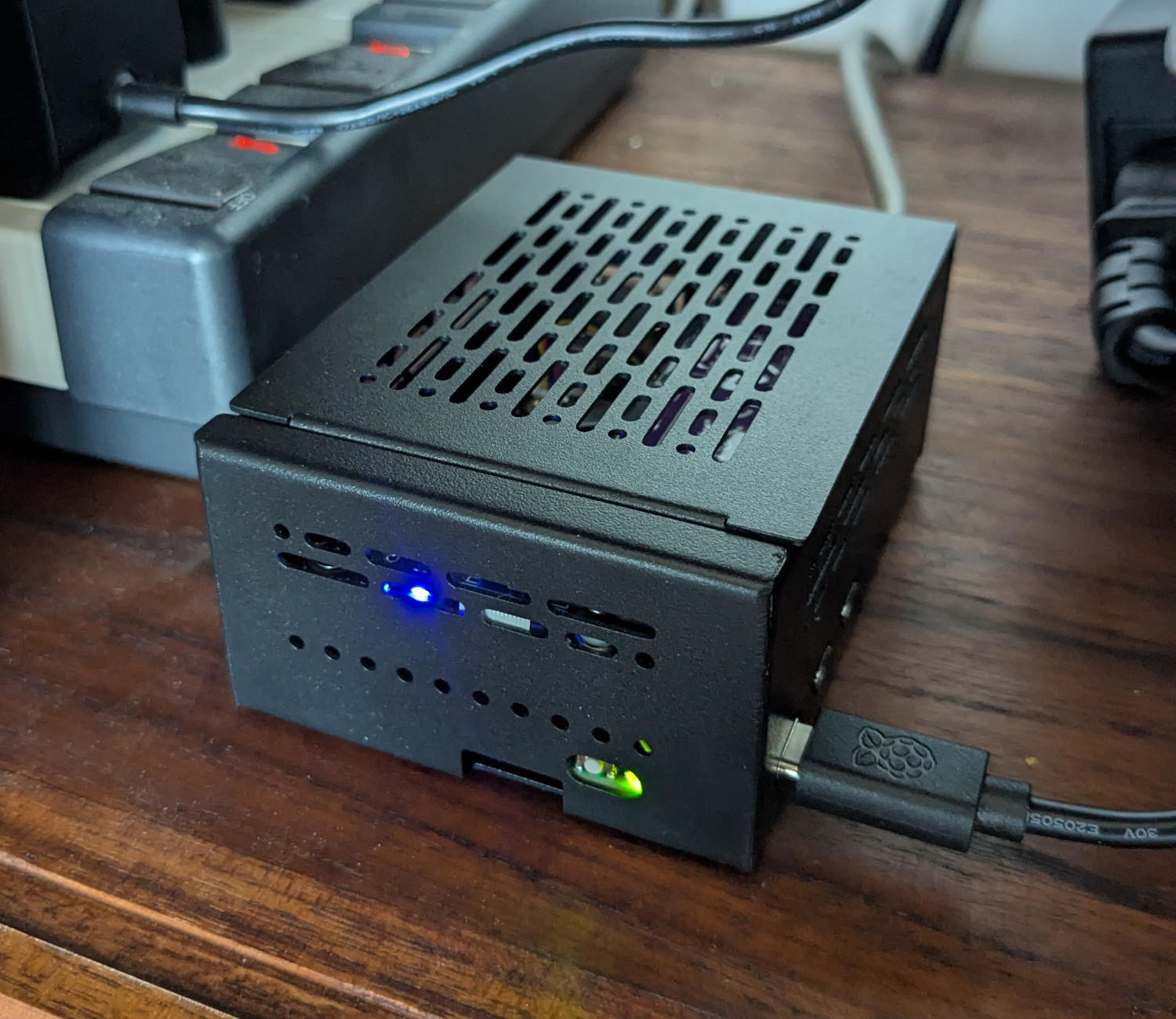
So, meet the Talbingo server, serving this site from a cupboard and a 1 TB Samsung 990 Pro SSD, somewhere on the internet!
Ten years ago this would have been a joke. Today, it's not too shabby. Go ahead and scoff. Then go look at what four cores, 16 GB RAM and 1 TB of storage will cost you on a commercial VPS.
Copyright, all rights reserved.